Payments using Airline-issued UATP Cards
UATP (Universal Air Travel Plan) is a payment network designed for the airline industry. If you have an airline-issued UATP card, you can configure it on the Routespring platform as the centralized payment method. Here’s how you can configure it:
- Go to Company Dashboard > Payment Methods > Vendor Specific or click here https://dashboard.routespring.com/admin?type=paymentMethods
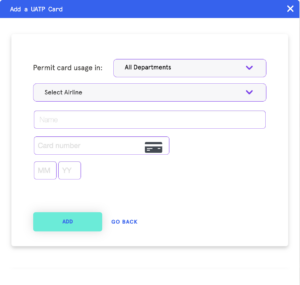
- Click on “Add UATP card”
- Configure usage settings and add card details
- Select the department(s) where you want to permit the usage of this card. If you select specific departments, only the users in these departments can use this card.
- Select the airline that has issued this UATP card (if you have United PassPlus UATP, please read below for further instructions)