How to report a hotel check-in issue to Routespring support?
If you face any issues while checking in to your hotel booked via Routespring (for example, reservation not found, payment issues, or incorrect guest details), you can report the issue directly from your booking. This helps the Routespring support team take immediate action with the hotel.
If you are a traveler
Follow these steps to report a hotel check-in issue:
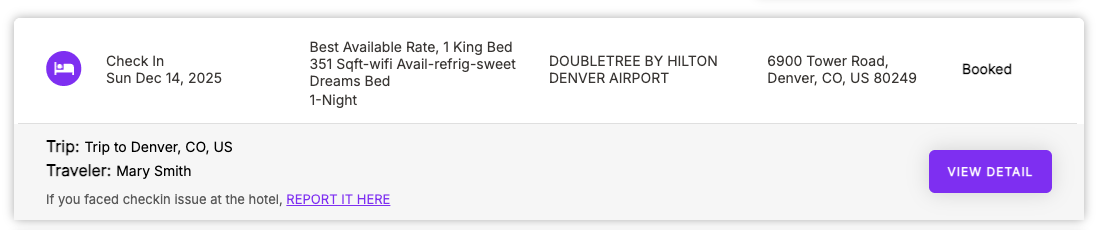
-
Go to My Trips in your Routespring account.
-
Find the hotel reservation where you faced the check-in issue.
-
Open the reservation and click on “Report it here.”
- Describe the issue you faced during check-in and submit the request.
Once submitted, the Routespring support team is notified and will get in touch with the hotel, and you directly, to resolve the issue as quickly as possible.
If you are a travel manager
If a traveler reports a hotel check-in issue to you, you can raise it on their behalf:
-
Go to Company Bookings in your Routespring account.
-
Find the hotel reservation where the traveler faced the check-in issue.
-
Open the reservation and click on “Report it here.”
-
Describe the issue faced by the traveler and submit the request.
This will notify the Routespring support team, who will coordinate with the hotel, and you and/or the traveler, to resolve the situation.
What happens after you report the issue?
-
The Routespring support team immediately reviews the reported issue.
-
They contact the hotel to understand and resolve the problem.
-
They stay in touch with you (and the traveler, if applicable) until the issue is resolved.
Tip: Reporting the issue directly from the reservation helps the support team act faster, as all booking details are automatically shared with them.